

Appearance
AI Systems
An AI System is the unit of governance work in Modulos. It sets a governance scope. It contains the frameworks, Controls, Evidence, and monetary risk quantification that make that scope auditable.
What this is
An AI System is a boundary that keeps governance work in one scope:
- one scope statement that an auditor can understand
- one set of frameworks and Requirements that apply to that scope
- one audit trail for Controls, Evidence, reviews, and risk decisions
AI Systems and the organization AI System
The AI Registry shows two types of entry, with the Type AI Application or Organization. The two types agree with how compliance and audits operate.
AI Systems
An AI System is for one deployed AI system or use case in its actual deployment context. The AI Registry shows it with the Type AI Application.
An AI system is more than a model. It includes the full socio-technical system that makes and uses AI outputs.
AI system
The model is the centre. The system is everything around it.
Inputs
DataTraining data, input data, labels, feedback
InfrastructureCloud, third parties, model providers
InterfacesAPI, UI, integrations
AI system
Outputs that influence real decisions
The bounded technical artifact under governance.
Model or modelsFoundation model, fine-tune, classifier
Inference & orchestrationPrompting, retrieval, routing, post-processing
Operations
Humans in the loopOperators, reviewers, escalation paths
MonitoringDrift, quality, incidents
Downstream decisionsBusiness process, automation, approvals
Documentation & controlsPolicies, evals, evidence
An AI system includes the model, the surrounding pipeline, the human processes, and the environment where outputs drive real decisions.
AI system definitions
"AI system" means a machine-based system that is designed to operate with varying levels of autonomy and that may exhibit adaptiveness after deployment, and that, for explicit or implicit objectives, infers, from the input it receives, how to generate outputs such as predictions, content, recommendations, or decisions that can influence physical or virtual environments.
NIST AI RMF definition, adapted from OECD:
The AI RMF refers to an AI system as an engineered or machine-based system that can, for a given set of objectives, generate outputs such as predictions, recommendations, or decisions influencing real or virtual environments. AI systems are designed to operate with varying levels of autonomy.
Use an AI System for frameworks that apply to one system, for example the EU AI Act.
The organization AI System
One organization AI System holds the governance programs and management systems of the full organization:
- policies and procedures that apply to all teams
- shared Controls that more than one framework uses
- audits for a certification where the scope is the organization, not one system
The AI Registry shows it with the Type Organization. Organization-scope frameworks (OFF-x), for example ISO 42001 and ISO 27001, attach to it.
The AI Registry cannot make a new organization AI System. If your organization does not have one, contact Modulos before you use organization-scope frameworks.
Where in Modulos
AI Registry → AI Systemsshows the AI Systems that you can see, and New AI System registers a new one.AI Registry → My Submissionsshows the AI Systems that you made, with the Drafts.AI System → Overviewshows the registration record: the intended purpose, the EU AI Act classification, the Owner, the Current State, the scopes, and the registration status. Its Comments and Logs tab holds the comments and the log of the AI System.AI System → Dashboardshows how much of the work is complete, and the risk values of one AI System.AI System → Graphshows the frameworks, Requirements, Controls, and tests as a map.AI System → Requirements,Controls,Risks,Evidence,Assets,Runtime Inspection, andJobsare where the work of the AI System occurs.AI System → Settingsconfigures registration details, frameworks, user access, and Sources.
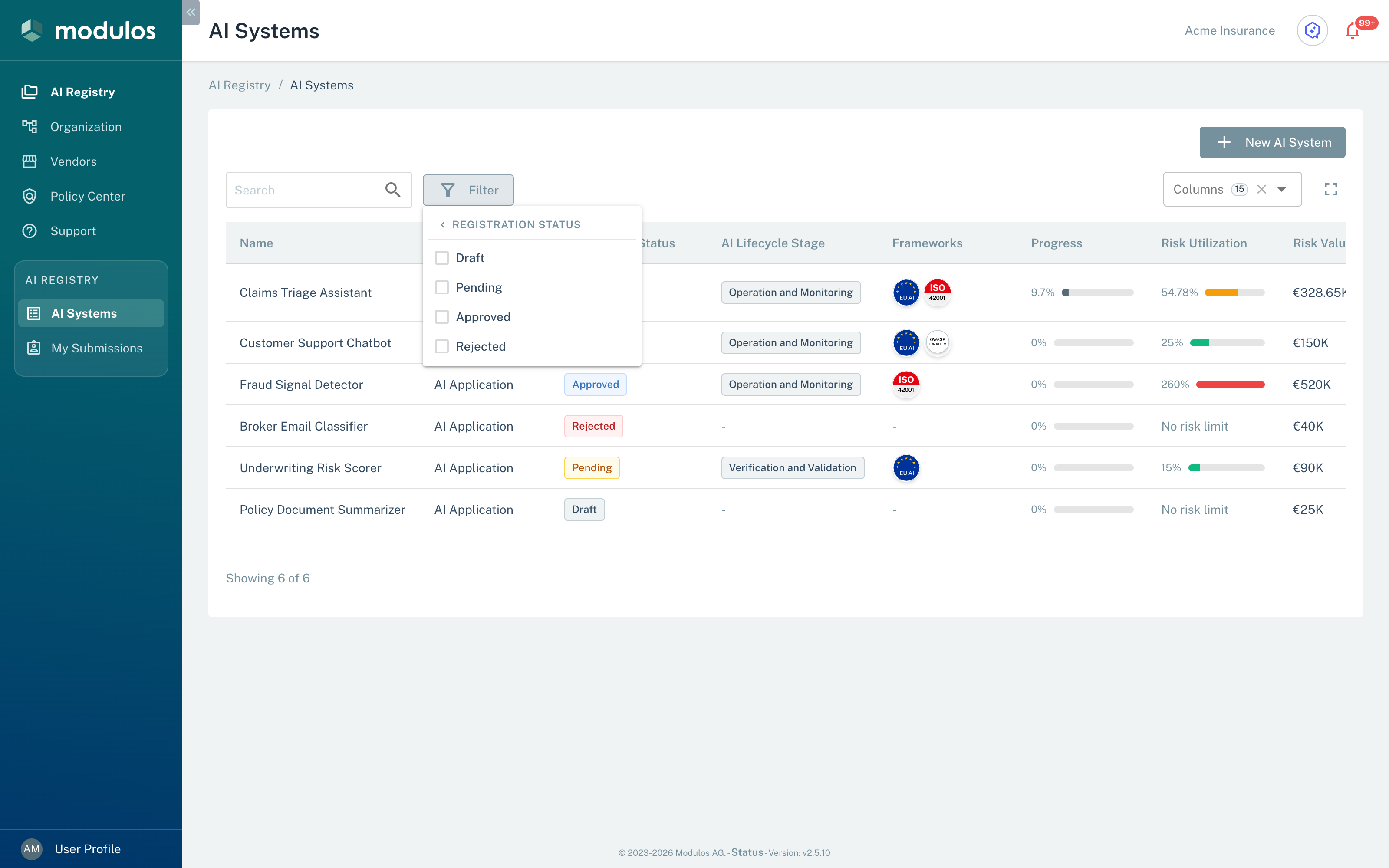
- 1Registration StatusThe registration status of each AI System. Select a Draft to open the wizard.
- 2FilterShows only the AI Systems with the selected values.
- 3New AI SystemOpens the create dialog. All users can register AI Systems.
Who can do what
Permissions
- AI System Owners configure the AI System, give AI System roles, and manage the settings.
- Editors do the work on Controls, attach Evidence, and keep work items up to date.
- Viewers read the AI System and add comments for traceability. They cannot change items.
Organization Admins, Organization Risk Managers, and Organization Policy Managers have full access to all AI Systems of the organization. An Organization Admin or an Organization Registration Manager approves or rejects a new AI System. See Registration approval. Give AI System roles to other users with only the access that they must have, to keep separation of duties. See User Management.
How it works
An AI System puts governance, risk quantification, and Runtime Inspection in the same scope boundary.
Project boundary
Project
Governance
Frameworks
Requirements
Controls
Evidence
Reviews
Risk
Risks
Threat vectors
Quantification runs
Treatment decisions
Runtime Inspection
Sources
Metrics
Tests
Results
Audit trail
Projects keep scope, execution, and traceability in one place so audits can follow decisions back to evidence.
Because of this shared structure, exports and reviews are traceable.
What lives in an AI System
An AI System can contain these items, as your organization setup permits:
- frameworks, Requirements, Controls, and Evidence
- risks and monetary quantification runs
- Runtime Inspection Sources, tests, Jobs, and results
- Assets and documents
- notifications, comments, and logs on each item
How to use it
1
Select the correct scope
Register an AI System for compliance of one system; management-system frameworks attach to the organization AI System
2
Write a scope statement
Write what is in scope in plain words that an auditor can examine
3
Add frameworks
Select the regulations and standards that apply to this scope
4
Give roles
Set Owners, Editors, and Viewers at the start to keep separation of duties
5
Do the work and monitor it
Do the Controls, attach Evidence, quantify the top risks, and run tests over time
Important considerations
- Keep each AI System narrow. One AI System for each deployed system or use case keeps Evidence and risk quantification defensible.
- Use the AI System description as your scope statement. Write it to stay correct when staff change and when auditors examine it.
- Use the organization AI System only for shared Controls and policies.
Related pages
Register an AI System
Register an AI System, send it for approval, and give roles and frameworks
AI System Dashboard
Status of the work, risk values, and frameworks of one AI System
Compliance Graph
Map of frameworks, Requirements, Controls, and tests
AI System Settings
Configure frameworks, access, EU AI Act scoping, and Sources