

Appearance
Requirements
Requirements are the "what" of a framework: the obligations that come directly from the regulation or standard.
What this is
Requirements are the compliance "contract" for the scope of an AI System. They are:
- from the framework: they keep the structure of the source document
- mapped to Controls: you do the work one time and use it for more than one Requirement
- fulfilled on purpose: the Requirement Owner records the decision that the obligation is satisfied
For the end-to-end model, see Governance Operating Model.
Where in Modulos
AI System → Requirementsto see the obligations, filter by framework, and monitor fulfillment- Open a Requirement to see the tabs Requirement and Comments and Logs. The Requirement tab shows the Description, the Details, and the Mapped Controls. The right panel shows Status, Owner, and Mapped Frameworks.
Who can do what
Permissions
- All members of an AI System can see its Requirements and the mapped Controls.
- Only an AI System Owner can select the Requirement Owner. The Requirement Owner must be an AI System Owner or an Editor.
- Only the Requirement Owner can change the status of a Requirement.
- The Requirement Owner selects the Control Owners of the mapped Controls.
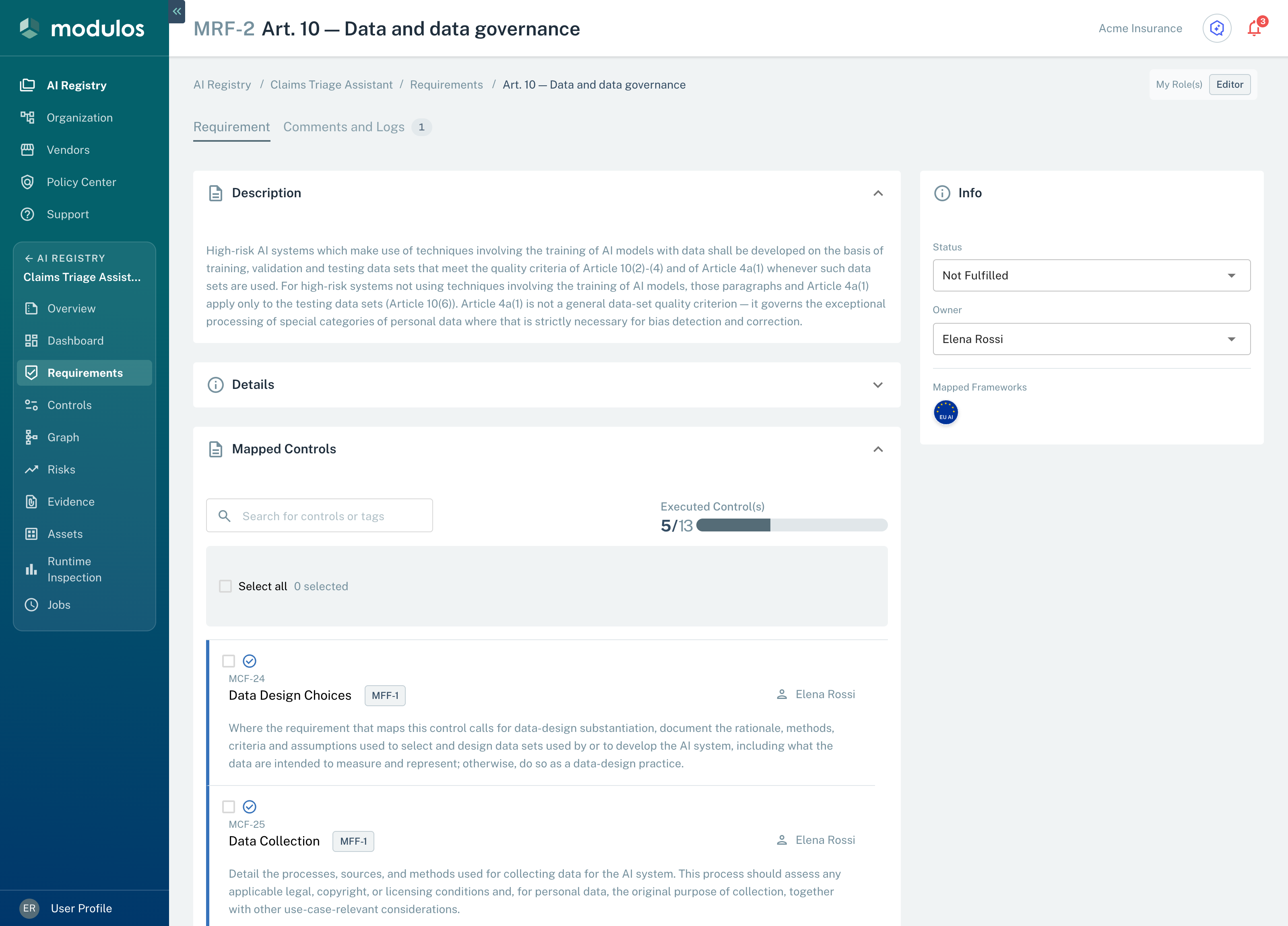
- 1RequirementThe header shows the code and the name of the Requirement.
- 2StatusOnly the Requirement Owner can change the status.
- 3Executed Control(s)Shows how many mapped Controls are Executed or Out of Scope. Archived Controls do not count.
- 4Mapped ControlsSelect Controls to change their Owner or status together.
How it works
Requirements are framework-derived
When you add a framework to an AI System, Modulos makes Requirements that keep the structure of the framework. Each Requirement has its own code, for example MRF-213. Most Requirements give the article or clause of the source in their name or in Details. This lets auditors see which obligation a Control and an Evidence item are for.
Requirements map to Controls
Requirements do not hold the work. They map to Controls, and the Controls do the work:
- many Requirements can map to one Control
- one Requirement can map to more than one Control, when the obligation has more than one measure
When an AI System Owner selects a Requirement Owner, Modulos also makes that user the Owner of each mapped Control that has no Owner.
In Mapped Controls, the Requirement Owner can change more than one Control at the same time. Select the Controls, then set Assign To or Change Status, and select Apply Changes.
Change Status has no comment field. As a result, Modulos rejects a change from Executed to Not Executed when a mapped Requirement of the Control is ready for review. Make this change on the page of the Control, where you can type why.
Status and readiness are different
A Requirement has a status:
- Not Fulfilled or Fulfilled
- Out of Scope for an item that does not apply
A Requirement also has a different signal: ready for review.
This is an important difference: in Modulos, fulfillment is a decision that the Requirement Owner records. Modulos does not set Fulfilled automatically.
What "ready for review" means
A Requirement is ready for review when all its mapped Controls have a final status: Executed, Out of Scope, or Archived. The Requirement Owner then gets a notification and these tasks:
- examine the mapped Controls and their Evidence
- make sure that the obligation is satisfied for the scope of this AI System
- mark the Requirement as Fulfilled
While the Requirement is ready for review and Not Fulfilled, the page shows the banner "Requirement is ready to be reviewed. If all related controls are correctly executed mark this requirement as Fulfilled." with the button Mark as Fulfilled.
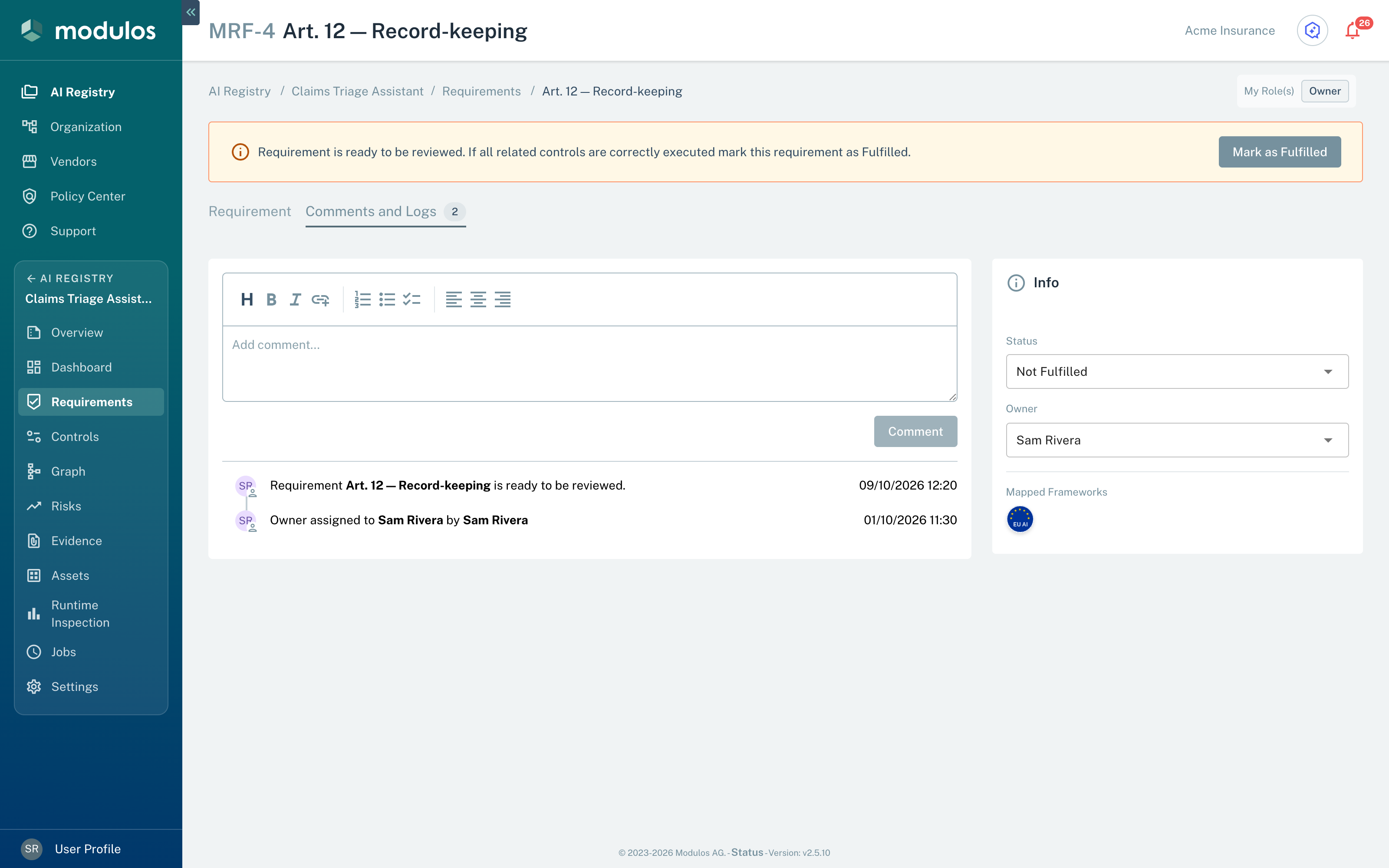
- 1Requirement is ready to be reviewed.Shows that all mapped Controls have a final status.
- 2Mark as FulfilledRecords the fulfillment decision of the Requirement Owner.
- 3Comments and LogsShows when the Requirement became ready for review.
- 4StatusStays Not Fulfilled until the Requirement Owner marks it as Fulfilled.
Marking a Requirement as fulfilled
Only the Requirement Owner can mark a Requirement as Fulfilled, and only when all its mapped Controls have a final status. Modulos records the decision in Comments and Logs.
While a Requirement is Fulfilled, its mapped Controls cannot change their status. To reopen the work, the Requirement Owner sets the Requirement to Not Fulfilled. For the Control rules, see Reviews & Statuses.
The diagram below shows how a Requirement becomes ready for review and how the Requirement Owner marks it as Fulfilled.
Requirement readiness
Each linked control must be final before the requirement is ready for review.
Linked controls
Control AExecuted
Control BExecuted
Control COut of Scope
Requirement
Requirement
Risk management
Becomes ready when all linked controls are final.
Readiness
Ready for reviewAll linked controls are final
FulfilledOwner attests after review
A Requirement can become Fulfilled only when all its mapped Controls have a final status: Executed, Out of Scope, or Archived.
How to use it
1
Start from frameworks
Add the frameworks that agree with the scope of your audit
2
Select a Requirement Owner
An AI System Owner selects the user who records the fulfillment decision
3
Complete the mapped Controls
The Control Owners do the work and attach Evidence
4
Examine when ready for review
Make sure that the Evidence and the reports satisfy the obligation
5
Mark as Fulfilled
Record the decision when all mapped Controls have a final status
Important considerations
- Requirements are obligations, not tasks. Use Controls for the work.
- Mark a Requirement as Fulfilled only when Evidence shows it. If you cannot show it to an auditor, the Requirement is not fulfilled.
- Use Out of Scope only when necessary, and make it agree with the scope statement of the AI System. Then auditors can examine each exclusion.