

Appearance
Controls
Controls are the "how" of compliance: the measures that you apply to satisfy Requirements. One Control can map to Requirements of more than one framework, and it keeps the record that an audit uses.
What this is
A Control is a unit of work that you can use for more than one Requirement. One good Control can satisfy Requirements of different frameworks, and you do the work only one time.
A Control has three parts:
- narrative: the report that tells what you do and why it satisfies the obligation
- proof: the Evidence and the Policies that are attached to the Control
- decision history: the comments and the logs in Comments and Logs
Control anatomy
Each Control has one Evidence section for all its files.
Header
MCF-184Logging Capability
Info panel
OwnerDana Weber
Mapped Frameworks
Mapped Requirement(s)
Control tab
Overview
The question and the description of the Control.
User Guidance
Instructions for the work, if the Control has them.
Evidence
All the files that show that the Control is done.
logging_design.md log_retention_Q4.pdf event_log_sample.csv log_settings.txt
Associated Policies
Part of the Evidence section: published Policies from Policy Center.
Logging Policy
The Evidence section contains all the files that show that the Control is done. You can attach one Evidence item to more than one Control. The narrative is on the Report tab, and the history is in Comments and Logs.
For the full operating model, see Governance Operating Model.
Where in Modulos
AI System → Controlsto see the Controls of an AI System and open one. The sidebar filters by status, by framework, and by Controls that are assigned to you. The filter bar filters by tags and by AI Assessment (Assessed or Not assessed). Control codes sort in number sequence (MCF-2 before MCF-10).- Open a Control to see its tabs: Control, Report, Assessment, and Comments and Logs. The Assessment tab shows the result of the Control Assessment Agent when this agent is available to your organization.
Who can do what
Permissions
- All members of an AI System can see its Controls, the Evidence, and the history.
- AI System Owners and Editors can edit Controls and attach Evidence.
- The Control Owner does the work of the Control. The Control Owner must be an AI System Owner or an Editor. The owner of a mapped Requirement selects the Control Owner.
- Only the Control Owner or the owner of a mapped Requirement can change the status of a Control, whatever their organization role. The table below shows who sees the Status selector and which changes Modulos saves.
- Viewers can see Controls, Evidence, and the history, and they can add comments. They cannot change Controls or Evidence.
| Who | Status field | Status change |
|---|---|---|
| Control Owner | Selector | Saved |
| Owner of a mapped Requirement | Selector | Saved |
| Other AI System Owners and Editors | Selector | Rejected |
| Organization Admins, Risk Managers, and Policy Managers (access to all AI Systems) | Selector | Rejected, unless the user also is the Control Owner or the owner of a mapped Requirement. This needs the AI System role Owner or Editor. |
| Viewers | Text | Not possible |
Modulos rejects a change from other users with the message "Only Control Owner or Requirement Owner can change the Status of a Control." A mapped Requirement that is Fulfilled blocks the change for everyone. For this lock, see Locking and why it matters.
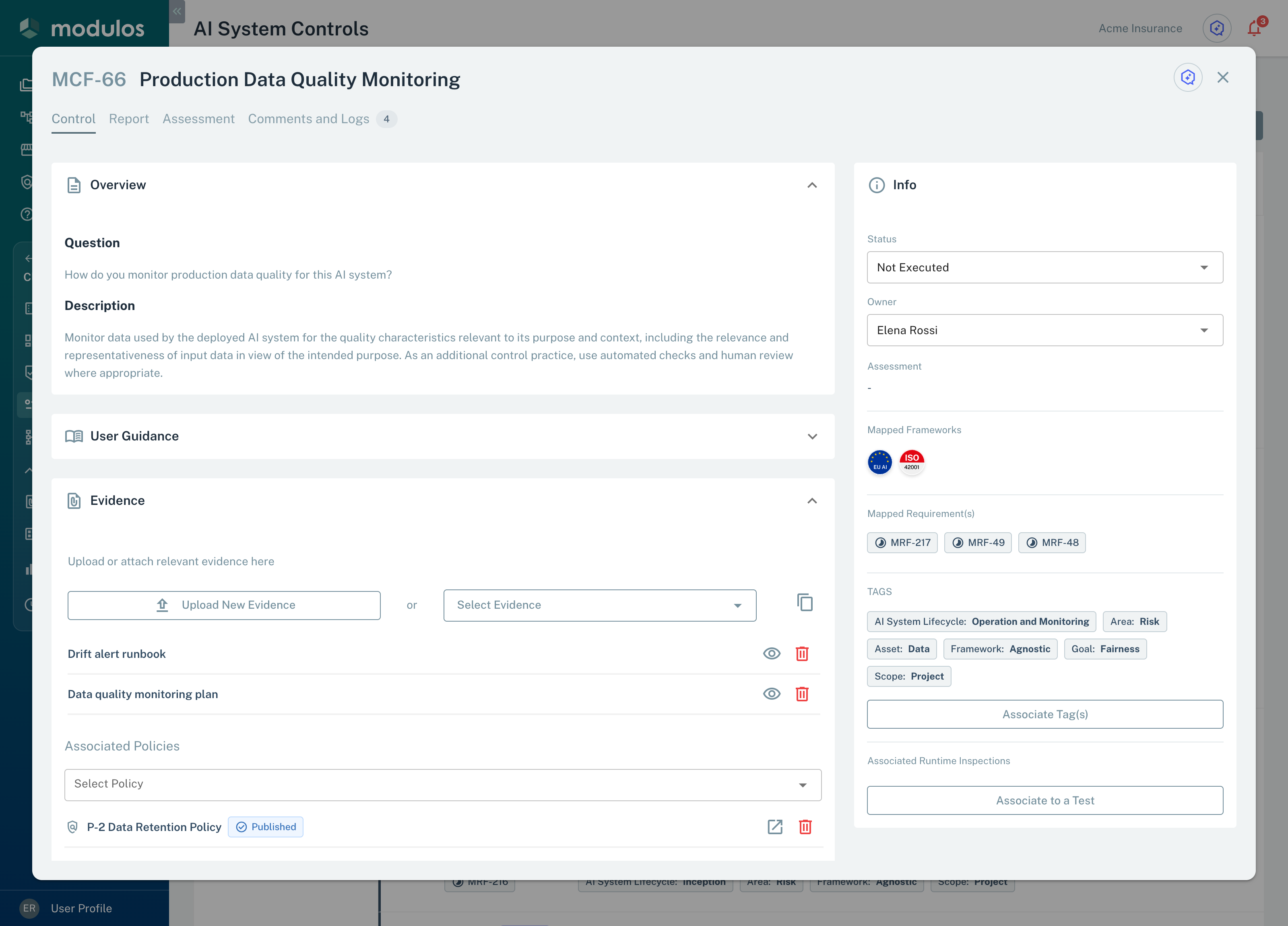
- 1ControlHolds the question, the user guidance, and the Evidence.
- 2EvidenceAttach the Evidence that shows how the Control is done.
- 3StatusThe Control Owner or the owner of a mapped Requirement changes it.
- 4Mapped Requirement(s)The Requirements that this Control helps to satisfy.
How it works
Control anatomy: sections and Evidence
Each Control has the same parts. On the Control tab:
- Overview shows the question and the description of the Control.
- User Guidance gives instructions for the Control, if the Control has them.
- Evidence is where you attach Evidence files. Each Control has one Evidence section. Below it, Associated Policies links published Policies from Policy Center.
On the Report tab, you write the narrative of the Control in the report template and select Submit.
The right panel shows Status, Owner, the Assessment score, Mapped Frameworks, Mapped Requirement(s), TAGS, and Associated Runtime Inspections.
One Evidence item can be attached to more than one Control. For the Evidence rules, see Evidence.
Status changes
A Control is Not Executed, Executed, Out of Scope, or Archived. The Control Owner or the owner of a mapped Requirement sets the status directly in the Status field, and Modulos logs each change. There is no reviewer approval. A comment is necessary only when an Executed Control goes back to Not Executed while a mapped Requirement is ready for review. For who can change the status, see Who can do what. For all the status rules, see Reviews & Statuses.
Locking and why it matters
While a Control is Executed, Out of Scope, or Archived, Modulos locks it:
- you cannot edit the report, change the Evidence, or add tags
- the Owner field is locked, but the owner of a mapped Requirement can change the Control Owner with Assign To in Mapped Controls
- the Evidence that is attached to the Control is locked too
You can change the status again, but not while a mapped Requirement is Fulfilled. Modulos logs each change, and the lock keeps the record of the audit correct.
Links: Requirements, Evidence, Policies, and tests
A Control connects these items:
- Requirements map to Controls. A Requirement is ready for review when all its mapped Controls have a final status.
- Evidence and Policies attach to the Control as proof. When a user archives a linked Policy, Modulos sets an Executed Control to Not Executed and removes the Policy from a Not Executed Control. See Lifecycle & Approvals.
- Metric Tests and Agent Tests show in Associated Runtime Inspections. You can add a test with Associate to a Test, or remove one, only while the Control is Not Executed. When a mapped Metric Test fails or has an error, or a mapped Agent Test fails, Modulos sets an Executed Control to Not Executed. See Results & Remediation.
How to use it
1
Start with Controls that map to many Requirements
One Control that satisfies Requirements of more than one framework gives the most value
2
Select a Control Owner
The owner of a mapped Requirement selects the AI System Owner or Editor who does the work
3
Write the report
Tell what you do and how it satisfies the obligation
4
Attach Evidence
Attach the files that show that the Control is done
5
Set the status
The Control Owner sets the status to Executed
Important considerations
- Do not make one Control for each Requirement. When you use one Control for many Requirements, the work grows less as you add frameworks.
- Set Executed only when the Control is done and has Evidence for this AI System.
- If you must reopen an Executed Control, tell why in a comment. Reopened work is usual in governance, and the comment keeps the cause on the record.