

Appearance
Frameworks in Modulos
Frameworks set the scope of governance work in Modulos. A framework is a regulation, a standard, or a structure of internal policy. Examples are the EU AI Act, ISO 42001, and the NIST AI RMF.
For the frameworks that Modulos supports, see Frameworks Overview.
What this is
In Modulos, frameworks do three things:
- they tell what applies to an AI System
- they keep traceability to the source document through Requirements
- they let you use one Control for more than one framework through mapped Controls
Modulos keeps the "what" and the "how" apart:
- Requirements are the obligations from the framework, and they keep the structure of the framework.
- Controls are the "how". One Control can map to Requirements of one or more frameworks.
This mapping gives a unified Control framework: one Control can satisfy many Requirements of many frameworks, with one set of Evidence.
For the full end-to-end flow, see Governance Operating Model.
Where in Modulos
AI System → Settings → Frameworksto add frameworks, see their versions, update them to the latest version, and freeze updatesAI System → Requirementsto see the obligations from the frameworks and their fulfillment statusAI System → Controlsto complete the Controls that map across RequirementsAI System → Dashboardto see how much of each framework is completeOrganization → Frameworksto read each framework that the organization can add: its Requirements, its Controls, and its change log. See The Frameworks library.
Who can do what
Permissions
- All members of an AI System can see which frameworks apply.
- AI System Owners add frameworks with Add Framework and update them with Update Frameworks. You cannot remove a framework from an AI System.
- Freeze Updates shows only for the organization roles with access to all AI Systems: Organization Admin, Organization Risk Manager, and Organization Policy Manager. AI System roles cannot freeze updates.
- Editors do the work of the Controls that the frameworks add.
- Viewers can see the framework structure and follow the work to Requirements, Controls, and Evidence.
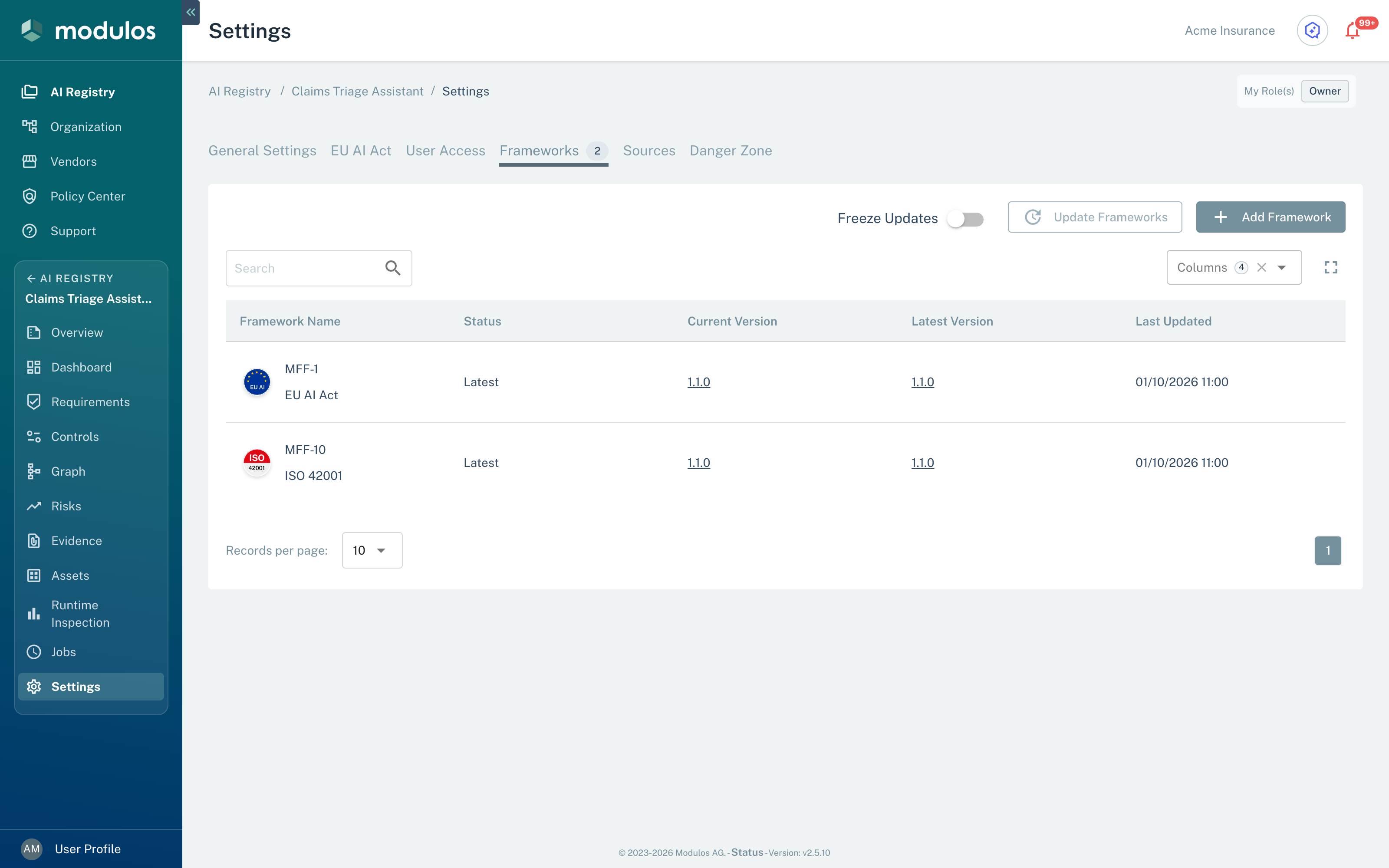
- 1FrameworksShows the frameworks that apply to this AI System.
- 2Freeze UpdatesPrevents framework updates. Editing the AI System stays possible.
- 3Update FrameworksUpdates each outdated framework. Not available when all are up to date.
- 4Current VersionEach framework shows its current version and the latest version.
How it works
Mapping (“what” and “how”)
When you add a framework, Modulos sets up the work. The setup keeps traceability and lets you use Controls again:
- Requirements keep the structure of the framework (the "what")
- Controls satisfy Requirements, and you can use them for more than one framework (the "how")
- Evidence attaches to Controls as proof
The diagram below shows how Requirements map to a shared layer of Controls, with Evidence below them.
Framework mapping
Three layers, one reusable column.
Frameworks
EU AI Act
ISO 42001
Requirements
Art. 9.1Risk management
Art. 10.2Data governance
8.2AI risk assessment
Evidence
Risk register
Test results
Controls
The reusable column
One Control satisfies many Requirements across many frameworks, and keeps the Evidence that proves it.
Risk assessment process
Data validation checks
Each layer connects to the Controls column. The same Control can satisfy a regulatory article and a standards clause, and keep the Evidence for the article and the clause.
Versions and stable scope
A framework in an AI System uses a template with a version. This keeps governance stable:
- you can tell which version you used
- auditors can see what changed between versions
- each AI System decides when it takes an update
The Frameworks tab shows, for each framework:
- the Status: Latest or Outdated
- the Current Version that the AI System uses
- the Latest Version of the template
An update of a framework changes the scope. An update can:
- add new Requirements and Controls
- change the mappings, which changes what "complete" means
- archive the Requirements and Controls that the new version does not have. Modulos logs each archived Control, but it makes no log entry for an archived Requirement.
Update Frameworks updates each outdated framework of the AI System. Before the update, a dialog shows the text "This action is irreversible and may impact the AI System status." While a framework is outdated, Add Framework is not available.
When a framework has a new version, Modulos sends an in-app notification with the tag Updated to the Organization Admins and to the Owners of each AI System that uses the framework. The notification opens the framework in the Frameworks library. In Notification Preferences, its row is Framework version updated.
Recommended practice:
- update frameworks at the start of your governance work, when changes are possible
- freeze framework updates near the audit, and the scope then stays the same
The diagram below shows how a pinned version and a freeze let you control when scope changes come into the AI System.
Framework versioning
Templates evolve. Projects pin a version, upgrade deliberately, and freeze near audit.
Template versions
v1.0
Initial
v1.1
Update
v1.2
Latest
Project pin
My Project
Pinned to v1.0
My Project
Updated to v1.2
Freeze updates
Freeze framework updatesPrevents new template versions from entering the project. Normal editing remains available.
Pin a version, upgrade when ready, freeze near audit. The project pin is the boundary between regulatory drift and a stable scope.
The Frameworks library
Organization → Frameworks lists the frameworks that your organization can add. It shows when governance is on for your organization, and all users of the organization can open it.
- The tab AI Applications lists the frameworks for AI Systems. The tab Organizational AI Systems lists the frameworks for the organization AI System.
- The columns are Framework Name, Version, Controls, and Requirements. On the AI Applications tab, select the version to open the Change Log dialog with the release notes of that version.
- Select a framework to open its page, with the tabs Details, Requirements, Controls, and Change Logs. Select a Requirement or a Control to read its description and its mappings. Change Logs lists each version with its release notes.
Read a framework in the library before you add it to an AI System. Before you select Update Frameworks, read the release notes of the new version.
How to use it
1
Select frameworks
Add the standards and regulations that apply to the scope of the AI System
2
Examine the Requirements
Learn which obligations apply and how they are structured
3
Complete the mapped Controls
Do the work of a Control one time and use it for all the Requirements that it maps to
4
Update frameworks on purpose
Accept new versions when you are prepared for scope changes
5
Freeze near the audit
Stop framework changes when the scope must stay stable
Important considerations
- A framework update can add work. Make the update a governance decision, not a maintenance task.
- If two frameworks have conflicting requirements, write down your interpretation in Assets and in the reports of the Controls. Then reviewers and auditors can follow your decision.
- Keep the description of the AI System in agreement with the frameworks that apply. If the scope moves, you must do audit work again.